
The systems and workflows we implement
Examples of what an audit and automation produce for vendors, distributors, and retailers, followed by systems already deployed and used in day-to-day operations
Workflow showcase
Order-to-Delivery Automation Workflow
An AI workflow for retail, distribution, and e-commerce operations
The workflow receives incoming requests from CRM, email, website forms, messengers, or marketplaces, extracts the order details, checks inventory against the connected systems, creates tasks for the responsible teams, prepares documents, updates delivery statuses, and raises alerts against defined conditionsInstead of disconnected chats, spreadsheets, and manual follow-ups, the business gets one controlled workflow with defined approval steps and an operational dashboard

- 1
Incoming Request
IntegrationA request arrives from CRM, website form, email, messenger, marketplace, or a sales manager.
- 2
Request Classification
AIThe model identifies the request type, extracts the order details from unstructured text, and assigns it to the correct workflow.
- 3
Data Validation
RulesValidation rules check whether all required order fields are present and well-formed, and request clarification when something is missing.
- 4
Inventory & System Check
IntegrationThe workflow reads stock availability, customer history, pricing rules, and order status directly from the connected systems.
- 5
Task Creation
RulesRouting rules create tasks for the sales, warehouse, logistics, procurement, or finance teams.
- 6
Document Preparation
AI + ApprovalInvoices, offers, packing lists, and supplier requests are drafted from templates, with the variable text generated by the model. An authorized employee approves before anything is sent.
- 7
Logistics & Fulfillment Update
IntegrationDelivery and fulfillment statuses are read from the logistics systems; delays and exceptions are flagged against defined thresholds.
- 8
Dashboard Update
IntegrationOrder progress, bottlenecks, pending approvals, delayed orders, and low-stock items are consolidated in one operational dashboard.
- 9
Alerts & Daily Summary
Rules + AIThreshold rules decide what raises an alert; the model writes the daily summary of what changed and what needs review.
Operational dashboard
- 42
- New orders today
- 6
- Need attention
- 3
- Delivery delays
- 2
- Low-stock SKUs
- 4
- Pending approvals
Illustrative dashboard. The figures are an example, not a client result.
What handles what
System integrations and rules
All deterministic operations: reading stock and order status, creating and routing tasks, updating statuses, applying thresholds, and refreshing the dashboard. These are explicit, repeatable, and produce the same result every run.
AI
Unstructured work only: classifying incoming requests, extracting order details from free text, searching documents, and drafting summaries and client-facing text. It does not move stock, approve orders, or change system records on its own.
Authorized employees
Exceptions and any action with material business impact — sending documents to a customer, committing stock, releasing an order against a credit limit. The workflow prepares the action and stops; a person approves it.
What the business gets
- Less manual order processing.
- Faster response to clients and internal teams.
- Consolidated visibility across orders, inventory, and logistics.
- Fewer missed tasks, delays, and forgotten follow-ups.
- Controlled automation: actions with material impact require approval from an authorized employee.
- One operational dashboard instead of scattered chats and spreadsheets.
Can be connected with
Depending on the systems you already use, the workflow connects to your CRM, ERP, spreadsheets, warehouse systems, e-commerce platforms, messengers, and custom APIs.
Want to map this workflow for your business?
N40 can audit your current order, inventory, and logistics processes, identify the automation opportunities, and design a workflow connected to the systems you already use
Representative scenarios
Built from the patterns we see most oftenIllustrative of scope and outcome, not specific clients

Retail & Distribution
Spreadsheet-to-dashboard automation
Operational problem
Managers collect, clean, and reconcile Excel and CSV reports by hand, so figures are several days old by the time they are reviewed.
Data sources
Excel / CSV exports, Google Sheets, ERP and POS extracts
What we build
Scheduled collection, validation, and reconciliation feeding a dashboard that refreshes automatically
Expected outcome
Reports are assembled by the system on a set schedule; the team reads the numbers instead of producing them.

Vendors, distributors & retailers
Management dashboard
Operational problem
Sales, margin, plan-fact, channels, SKUs, and stock live in separate files no one sees together.
Data sources
ERP, CRM, finance ledger, warehouse and channel data
What we build
One consolidated, role-based management dashboard over validated data
Expected outcome
Finance, operations, and management read the same defined metrics, refreshed daily.

Distributors
Inventory & receivables control
Operational problem
Stock turnover, slow-moving goods, receivables, and credit limits are tracked late and in fragments.
Data sources
ERP, warehouse system, finance and customer ledgers
What we build
Operational analytics with threshold rules on overdue receivables and slow-moving stock
Expected outcome
Cash-risk and dead-stock conditions are flagged while the position can still be corrected.

Vendors
Partner & dealer performance
Operational problem
Plan execution across partners, dealers, chains, regions, and managers is assembled by hand, weekly at best.
Data sources
Partner sell-out reports, shipment data, channel plans
What we build
Performance dashboards and plan-fact tracking with deviation thresholds
Expected outcome
Sell-out and plan execution are calculated continuously, with deviations flagged automatically.

Vendors, distributors & retailers
AI-assisted analysis interface
Operational problem
Leadership gets numbers late or in a format that takes more work to read than to act on.
Data sources
The consolidated, validated dataset built in the earlier stages
What we build
An interface for querying the data, explaining variances, and preparing summaries
Expected outcome
Recurring management questions are answered without manual data preparation; decisions stay with the manager.
Systems we've deployed
Systems already deployed and used in day-to-day operations, adjacent to the product-business workThe same engineering, applied

AI Operations Agent for a Business Director
One Telegram interface for tasks, finance, knowledge retrieval, calendar, and inbox triage, connected to the systems the company already uses. Self-hosted, and it retains authorized operational context across those systems between conversations.
Claude Sonnet 4.6, GPT-4o, PostgreSQL. Tasks, finance, knowledge and inbox triage in one interface.
See the build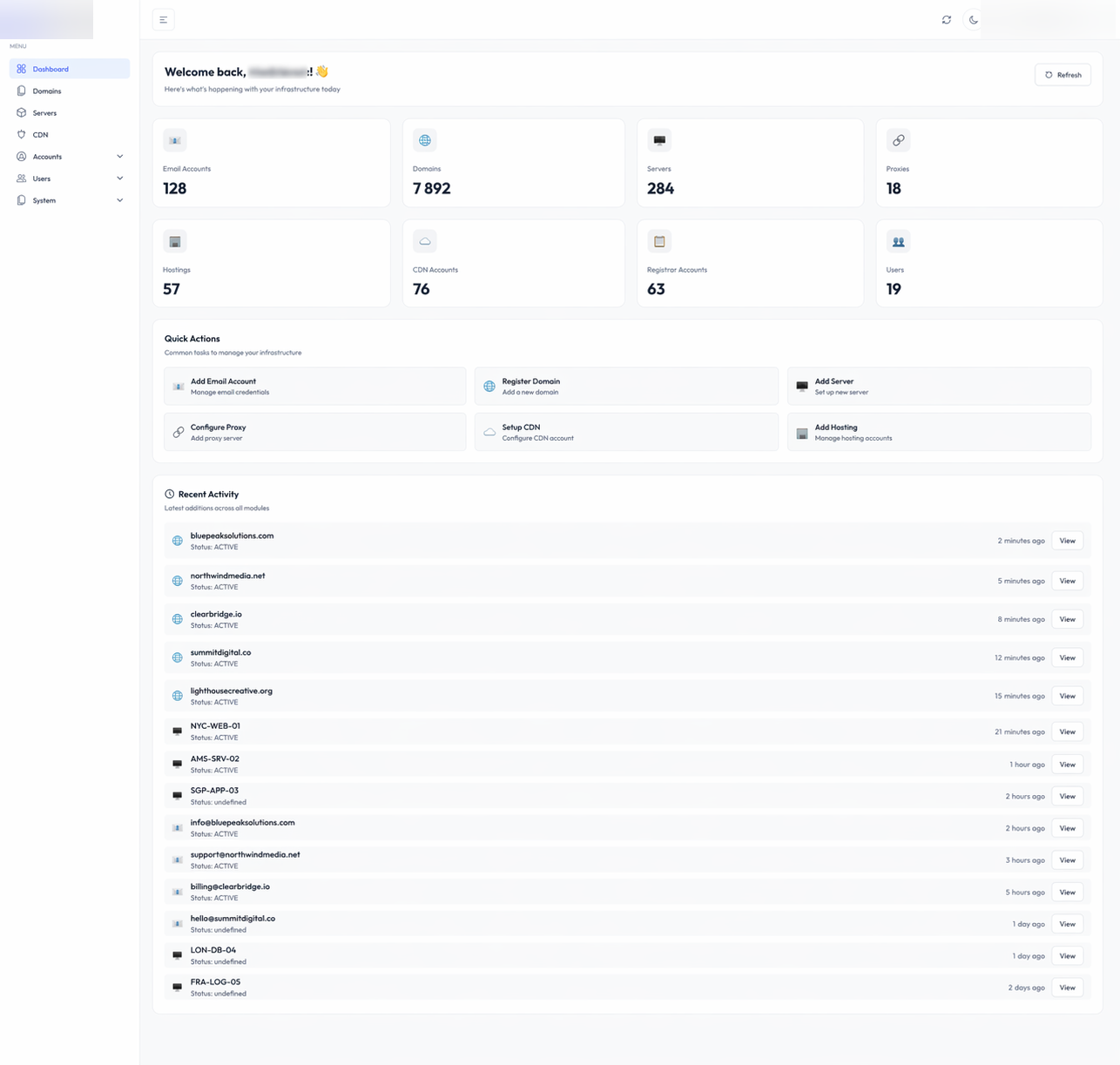
Storefront & Domain Management System for eCommerce
An internal management interface for a full portfolio of sites and their domains: registrar, DNS, hosting, and deployment in one place. Launch or clone storefronts, point domains, and deploy changes from the UI, without opening a separate provider panel for each step.
FastPanel, Keitaro, nginx. One management interface for a whole portfolio of online stores.
See the build
AI Campaign & Product Page Generator for eCommerce
A configurable workflow that turns a brief into a live page and deploys it directly to your CMS or store platform. It covers the product launches, promotions, and seasonal campaign pages a retail or ecommerce business publishes continuously, so routine page production does not require a designer for every request.
n8n, Claude, GPT-4o. From a brief to a live campaign page, automatically.
See the build